
The Front Panel
Additional Features & Advanced Configuration
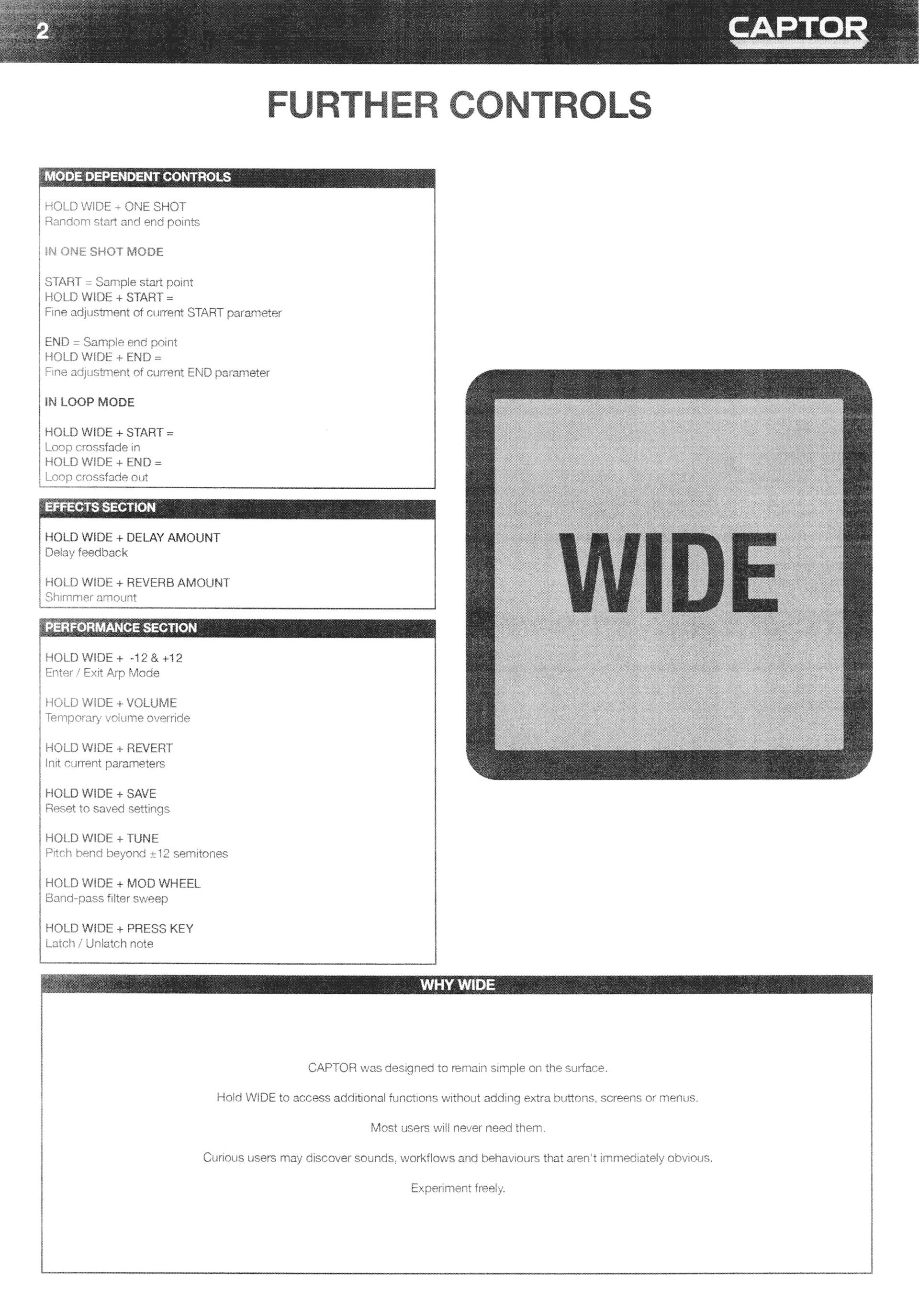
Most CAPTOR users will never need to go beyond this point.
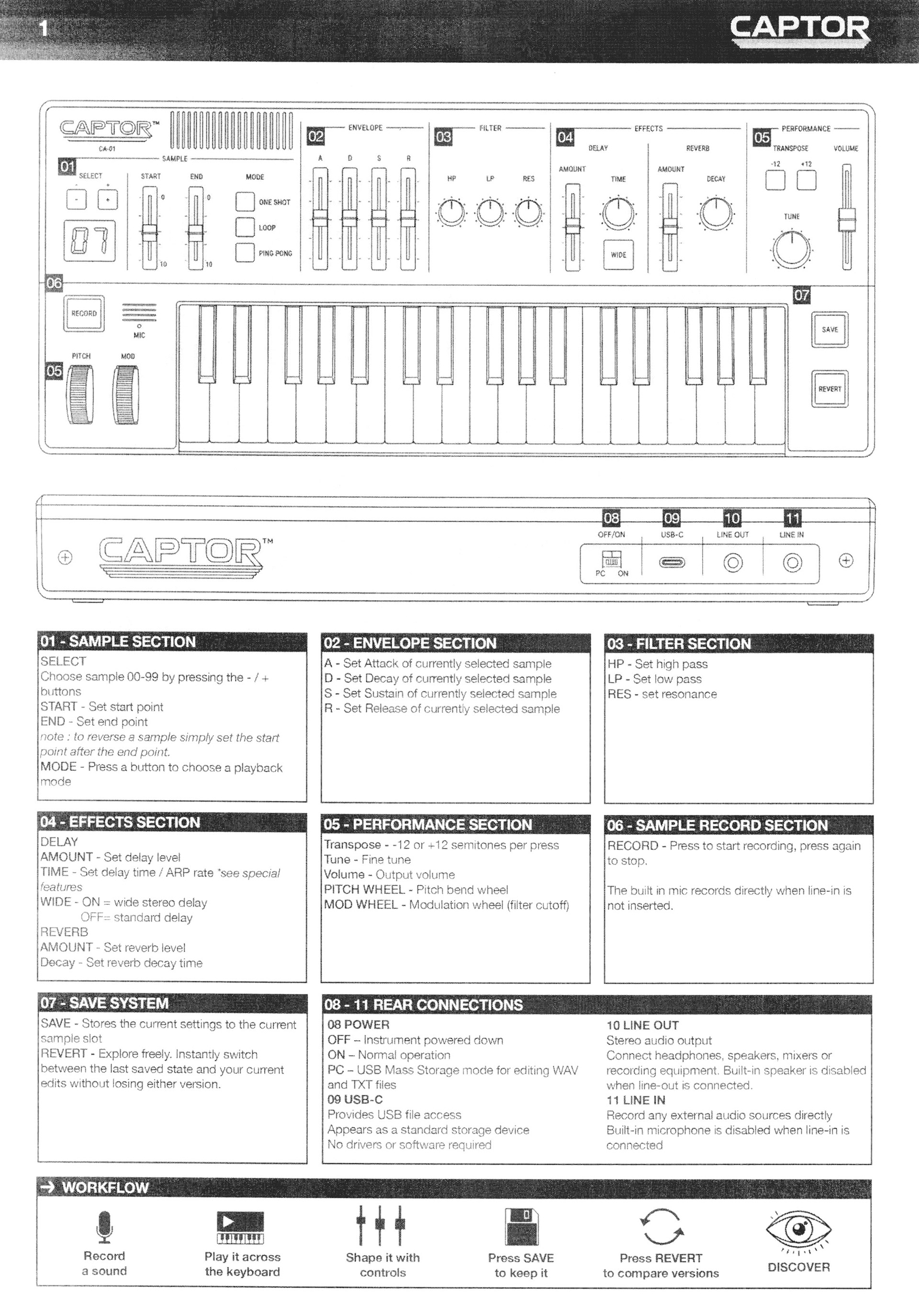
Everything on the front panel is designed to be immediate, playful and understandable.
For users who enjoy exploring deeper, CAPTOR exposes its internal structure through simple text files accessible over USB-C.
No software. No accounts. No proprietary formats. No apps that require other apps to run. What the hell is an SDK?
Open a text file.
Change a value.
Save it.
See what happens.
File Structure
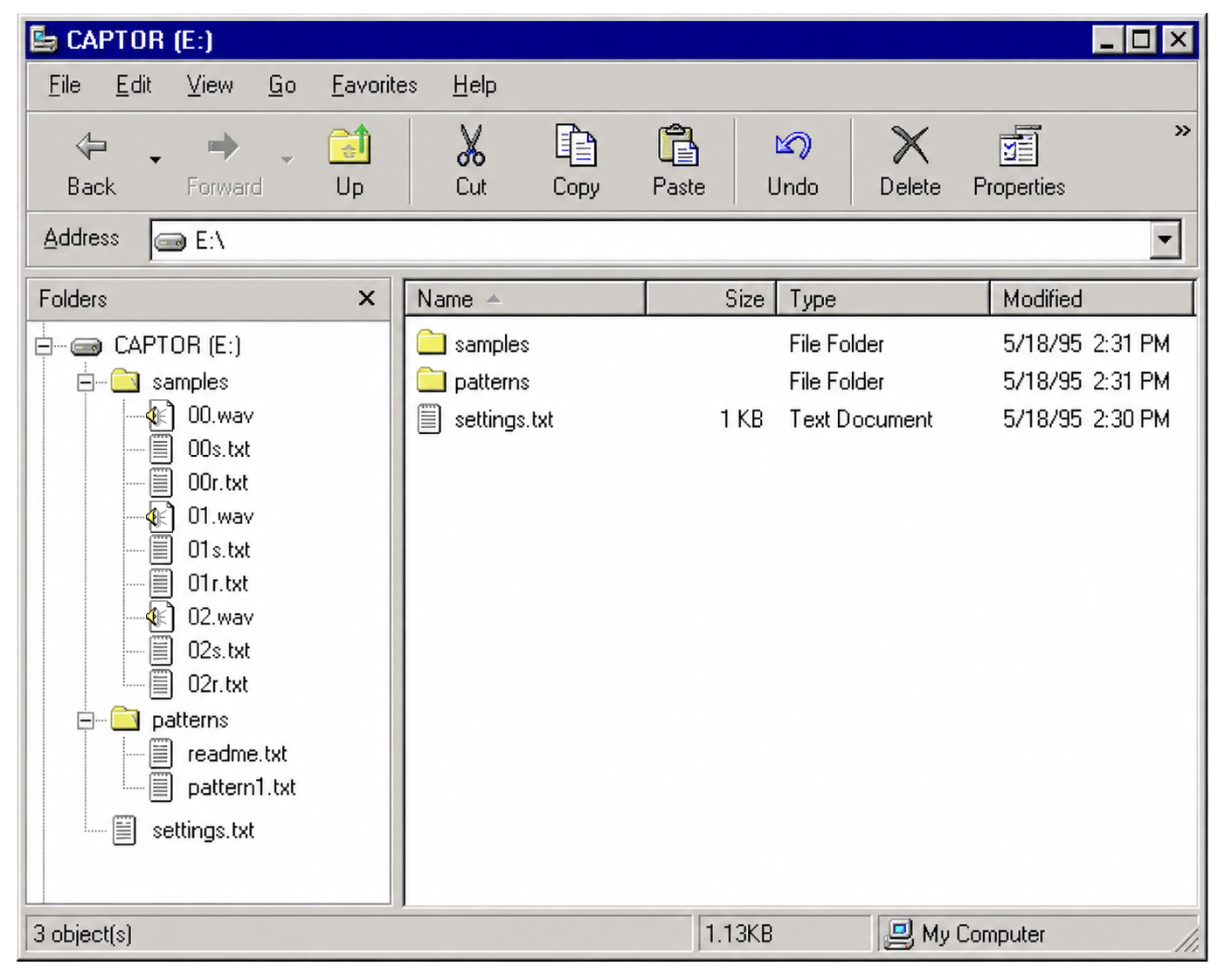
CAPTOR appears as a standard storage device.
Samples are kept in the 'Samples' folder:
../Samples/00.wav
../Samples/00s.txt
../Samples/00r.txct
../Samples/01.wav
../Samples/01s.txt
../Samples/01r.txt
../Samples/01s.txt
../Samples/01r.txt
../Samples/02.wav
../Samples/02s.txt
../Samples/02r.txt
../Samples/02s.txt
../Samples/02r.txt
...
../Samples/99.wav
../Samples/99s.txt
../Samples/99r.txt
../Samples/99s.txt
../Samples/99r.txt
The .wav file contains audio.
Imported files are automatically converted to CAPTOR's native 16-bit 44.1kHz format, when ready to play.
No manual conversion is required.
The xxS.txt file contains the saved settings for that sample.
The xxR.txt file contains the current revert settings for that sample.
Imported files are automatically converted to CAPTOR's native 16-bit 44.1kHz format, when ready to play.
No manual conversion is required.
The xxS.txt file contains the saved settings for that sample.
The xxR.txt file contains the current revert settings for that sample.
A ../settings.txt file is also available for global settings (sample settings can override global settings, more on this later).
One additional folder called '../Patterns' is available for deeper editing of the arpeggiator (more on this later).
Samples
CAPTOR provides 00-99 sample locations and accepts .WAV files of any length and bitrate (dependant on space). If 16bit 44.1khz wavs are transfered, the next boot will not perform a conversion process.
Each location behaves as a 'patch'. The 'REVERT' system essentially behaves as a second patch - anything saved can be recalled by pressing 'revert', the last parameter change for the current sample is autosaved to 'revert'.
So...Advanced Configuration?
When connected to a computer, CAPTOR enters USB Storage Mode and appears as a standard storage device.
Any WAV files, TXT files or pattern files can be edited using a standard text editor or file manager.
Once your changes have been saved, return to CAPTOR and press REVERT to commit the modified files to the currently selected sample.
The display will briefly show:
rE and any sample conversion will be performed, where necessary.
The sample will then reload using the updated settings.
To test changes without switching from USB mode to ON mode, hold REVERT and play the keyboard.
This allows parameters to be edited, committed and auditioned repeatedly while developing sounds.
If you manage to completely ruin a sample, hold REVERT and press SAVE to initialise xxS.txt to default settings.
Complete ../Samples/xxS.txt Parameterssample_name=text
sample_gain=0-200
root_note=C0-C8 //sample can define its original pitch, default=c5
start=0-100
end=0-100
mode=oneshot/loop/pingpong
attack=0-100
decay=0-100
sustain=0-100
release=0-100
filter_model=clean/vintage/dirty
//clean provides a transparent response, vintage introduces gentler slopes and subtle colouration, and dirty adds stronger colouration and more aggressive resonance behaviour.
filterhp=0-100
filterlp=0-100
resonance=0-100
sample_gain=0-200
root_note=C0-C8 //sample can define its original pitch, default=c5
start=0-100
end=0-100
mode=oneshot/loop/pingpong
attack=0-100
decay=0-100
sustain=0-100
release=0-100
filter_model=clean/vintage/dirty
//clean provides a transparent response, vintage introduces gentler slopes and subtle colouration, and dirty adds stronger colouration and more aggressive resonance behaviour.
filterhp=0-100
filterlp=0-100
resonance=0-100
filter_env_amount=-100 to +100 //use ADSR to control filter movement in addition to amp
delaymix=0-100
delaytime=0-100
reverbmix=0-100
reverbtime=0-100
volume=0-100
finetune=-50 to +50
quality=0-3
//quality=0 -quality=0 - 8kHz / 8-bit - Aggressively degraded
decay_rand=0-100
sustain_rand=0-100
release_rand=0-100
filterhp_rand=0-100
filterlp_rand=0-100
delaymix_rand=0-100
delaytime_rand=0-100
reverbmix_rand=0-100
reverbtime_rand=0-100
volume_rand=0-100
finetune_rand=0-100
delaymix=0-100
delaytime=0-100
reverbmix=0-100
reverbtime=0-100
volume=0-100
finetune=-50 to +50
quality=0-3
//quality=0 -quality=0 - 8kHz / 8-bit - Aggressively degraded
//quality=1 -11kHz / 8-bit - Vintage computer character.
//quality=2 - 26kHz / 12-bit - Classic sampler territory.
//quality=3 -44.1kHz / 16-bit - Clean playback.
latch=on/off
attack_rand=0-100 //quality=2 - 26kHz / 12-bit - Classic sampler territory.
//quality=3 -44.1kHz / 16-bit - Clean playback.
latch=on/off
//Press a key to hold a note, press the same key again to stop, press another key to move playback to that note.
mono=on/off
portamento=on/off
// the release parameter is repurposed as glide time between notes
crossfade_loop=0-100
//Smooths loop points by fading between the end and beginning of a sample
arp_enabled=on/off
arp_mode=up/repeat/down
arp_retrig=on/off
//default=on
//when off, newly played notes enter at the current arp position rather than returning to step 1
//PATTERN ENGINE
// Unlike a traditional arpeggiator,
// patterns are not limited to note data.
//
// All sample based parameters available in xxS.txt
// can be changed on any step.
//
// Patterns can:
// - play notes
// - play chords
// - trigger rests
// - automate filters
// - automate effects
// - automate sample start and end points
// - automate playback quality
// - automate looping behaviour
// - reference external pattern files
arp_pattern_up=text (default=0,+12)
arp_pattern_repeat=text (default=0.0)
arp_pattern_down=text (default=0,-12)
//patterns can be any length and can be polyphonic:
//use '&' to include notes or parameter changes per step
//use ',' to move to the next step
//use '_' for rests.
//patterns can include parameter changes per step
//and do not have to have note changes.
//patterns can point to additional text files (e.g ...=/patterns/patternName.txt)
//The possibilities are endless, except you can't hear them until you commit.
//This is purposeful.
//You are forced to use effort, intuition and then your ears
//and will absolutely always have happy accidents.
arp_rate_multiplier=1-16
// RANDOMISATION ENGINE
// Randomisation introduces natural variation
// between notes.
//
// Unlike velocity, variation is generated
// automatically around the stored value.
//
// Useful for:
//
// Analogue drift
// Humanisation
// Evolving pads
// Environmental textures
// Imperfect loops
// Repeated notes that avoid sounding mechanical
//Randomisation occurs around the stored value rather than across the entire parameter range; for example, if filterlp=50 and filterlp_rand=50, then filterlp will be randomised between 25 and 75 for each note played.
mono=on/off
portamento=on/off
// the release parameter is repurposed as glide time between notes
crossfade_loop=0-100
//Smooths loop points by fading between the end and beginning of a sample
arp_enabled=on/off
arp_mode=up/repeat/down
arp_retrig=on/off
//default=on
//when off, newly played notes enter at the current arp position rather than returning to step 1
//PATTERN ENGINE
// Unlike a traditional arpeggiator,
// patterns are not limited to note data.
//
// All sample based parameters available in xxS.txt
// can be changed on any step.
//
// Patterns can:
// - play notes
// - play chords
// - trigger rests
// - automate filters
// - automate effects
// - automate sample start and end points
// - automate playback quality
// - automate looping behaviour
// - reference external pattern files
arp_pattern_up=text (default=0,+12)
arp_pattern_repeat=text (default=0.0)
arp_pattern_down=text (default=0,-12)
//patterns can be any length and can be polyphonic:
//use '&' to include notes or parameter changes per step
//use ',' to move to the next step
//use '_' for rests.
//patterns can include parameter changes per step
//and do not have to have note changes.
//patterns can point to additional text files (e.g ...=/patterns/patternName.txt)
//The possibilities are endless, except you can't hear them until you commit.
//This is purposeful.
//You are forced to use effort, intuition and then your ears
//and will absolutely always have happy accidents.
arp_rate_multiplier=1-16
// RANDOMISATION ENGINE
// Randomisation introduces natural variation
// between notes.
//
// Unlike velocity, variation is generated
// automatically around the stored value.
//
// Useful for:
//
// Analogue drift
// Humanisation
// Evolving pads
// Environmental textures
// Imperfect loops
// Repeated notes that avoid sounding mechanical
//Randomisation occurs around the stored value rather than across the entire parameter range; for example, if filterlp=50 and filterlp_rand=50, then filterlp will be randomised between 25 and 75 for each note played.
decay_rand=0-100
sustain_rand=0-100
release_rand=0-100
filterhp_rand=0-100
filterlp_rand=0-100
delaymix_rand=0-100
delaytime_rand=0-100
reverbmix_rand=0-100
reverbtime_rand=0-100
volume_rand=0-100
finetune_rand=0-100
../settings.txt Parameters (adding these to the per sample TXT files overrides defaults for the selected patch)
master_volume=0-100
default_filter_model=clean/vintage/dirty
//clean provides a transparent response, vintage introduces gentler slopes and subtle colouration, and dirty adds stronger colouration and more aggressive resonance behaviour.
pitchbend_range=0-12
polyphony=1-12
transpose_limit=1-6
default_sample_gain=100
default_quality=0-3
default_crossfade_loop=0-100
default_filter_env_amount=-100 to +100
default_arp_rate_multiplier=1-16
arp_default_mode=up/repeat/down
boot_sample=00-99
mic_gate=on/off
mic_gate_threshold=0-100
normalize=on/off
auto_trim=on/off
default_filter_model=clean/vintage/dirty
//clean provides a transparent response, vintage introduces gentler slopes and subtle colouration, and dirty adds stronger colouration and more aggressive resonance behaviour.
pitchbend_range=0-12
polyphony=1-12
transpose_limit=1-6
default_sample_gain=100
default_quality=0-3
default_crossfade_loop=0-100
default_filter_env_amount=-100 to +100
default_arp_rate_multiplier=1-16
arp_default_mode=up/repeat/down
boot_sample=00-99
mic_gate=on/off
mic_gate_threshold=0-100
normalize=on/off
auto_trim=on/off
Final Thoughts
Most modern devices hide their workings.
CAPTOR does the opposite: every sound is a WAV file, every patch is a text file.
Every setting can be read, edited, copied, shared or ignored completely.
They can fit on floppy disks.
They can fit on floppy disks.
You can spend five minutes with CAPTOR and have fun.
Or you can spend five years discovering strange things nobody intended.
The five year-old enjoys CAPTOR in the same way they might have enjoyed an Amiga in 1989: amazed that it turns on at all.
The ten year-old who dusts it off a few years later, opens a text file, changes a few numbers and proudly shows their friends and family the ridiculous thing they unexpectedly made it do is the reason the text system exists.
Neither approach is more correct than the other.
The front panel is the instrument.
Everything else is simply an invitation.
Good luck.